Tags: Terraform Azure IaC Databricks DevOps
The problem
In Part 1 we built a FinOps pipeline on Azure Databricks that merges Azure infrastructure billing and Databricks DBU usage into one FOCUS-format cost lakehouse. It works. But if the workspace it runs in was assembled by clicking through the Azure portal, you own an environment nobody can review, reproduce, or roll back.
Portal-built platforms fail quietly. The network rule someone added during an incident is undocumented. The second workspace differs from the first in ways nobody can list. And the untagged clusters that fed Part 1’s “unmatched costs” bucket exist precisely because tagging was a manual step someone skipped.
The fix is to define everything as code: the landing zones that host the platform, the governance around it, and the pipelines inside it. In this post we walk through that blueprint with Terraform and Databricks Asset Bundles, using the same open-source modules we promised in Part 1. Every layer ends up reviewable in a pull request.
What is a Data Landing Zone?
A Data Landing Zone (DLZ) is a workload environment for data services such as Azure Databricks workspaces, storage accounts, and ingestion services. In our implementation, it operates as an application landing zone beneath an Azure Platform Landing Zone, the centralized foundation that governs and provides shared capabilities for all workloads. This follows Microsoft’s Cloud Adoption Framework for a unified data platform .
The split matters because it separates workload delivery from organizational governance. Data engineering teams iterate inside their DLZ, while the Platform team changes the shared foundation under stricter review. Encoding that boundary in Terraform state layout, not just in a diagram, is what makes the governance real.
Landing zones in Terraform
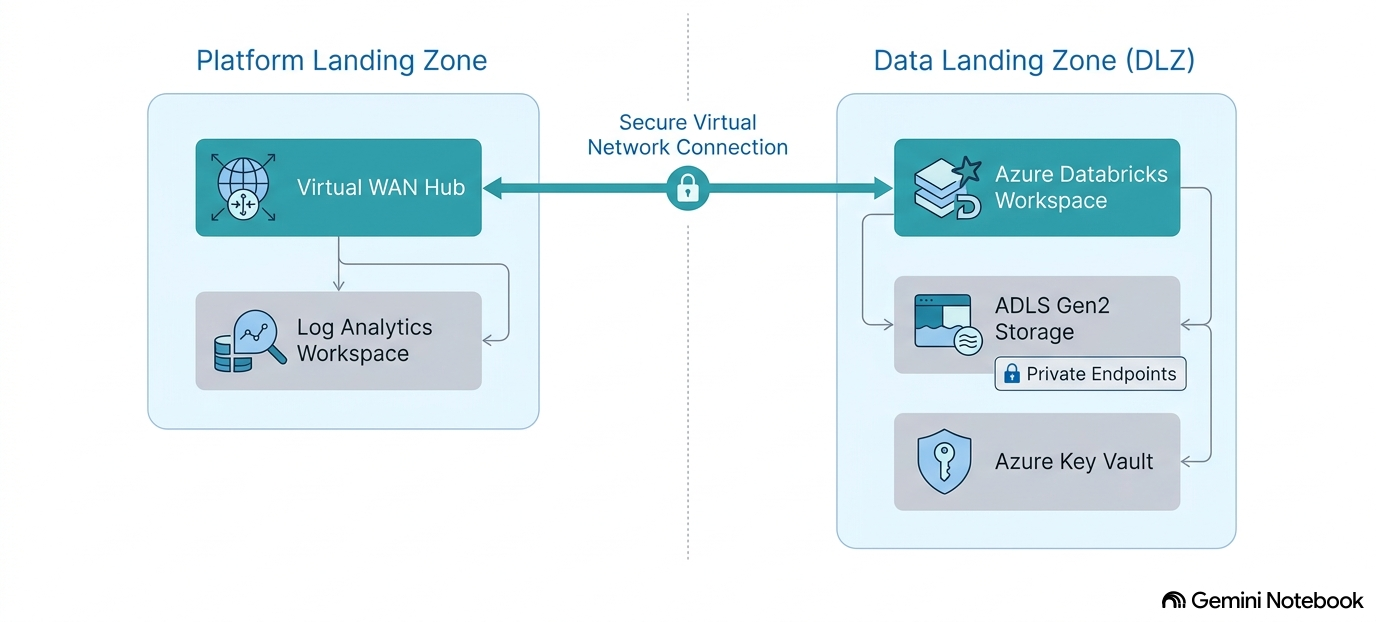
The platform and data landing zone topology we deploy
We deploy the platform foundation with the Azure Landing Zones Accelerator’s platform landing zone template . It creates the management-group hierarchy and configures the central management and connectivity subscriptions. The data landing zone module provisions each workload subscription: Databricks workspaces, ADLS Gen2 storage, Key Vault, and the network wiring into the platform’s hub-spoke fabric (Picture 1).
Pinning by release tag keeps upgrades deliberate:
module "platform_landing_zone" {
  source = "github.com/Azure/alz-terraform-accelerator.git//templates/platform_landing_zone?ref=v17.4.0"

  subscription_ids                  = var.subscription_ids
  starter_locations                 = var.starter_locations
  management_groups_enabled         = true
  management_group_settings         = var.management_group_settings
  management_resources_enabled      = true
  management_resource_settings      = var.management_resource_settings
  connectivity_type                 = "hub_and_spoke_vnet"
  connectivity_resource_groups      = var.connectivity_resource_groups
  hub_and_spoke_networks_settings   = var.hub_and_spoke_networks_settings
  hub_virtual_networks              = var.hub_virtual_networks
}
Azure organization: a platform landing zone governs workloads
Microsoft’s Azure landing zone reference architecture starts with one platform landing zone. Ours follows that model: management groups organize subscriptions, Azure Policy assignments attach at the appropriate management-group scope, and shared management and connectivity services live in dedicated platform subscriptions. A DLZ is a workload, or application, landing zone beneath that foundation.
The shared data-platform management group provides the team boundary. Every subscription below it inherits the same guardrails with no per-subscription setup, and subscription-level RBAC lets a Data engineering team hold Contributor on its own DLZ without changing Platform team resources.
Networking: hub-spoke and private endpoints as module inputs
The Platform Landing Zone provides the hub-and-spoke network. The Data Landing Zone consumes that shared foundation as inputs: virtual network, network security group, and route-table IDs. The DLZ module then attaches its subnets, private endpoints, and private DNS records to the platform network. Databricks workspaces come up with secure cluster connectivity and no public storage paths, because the module defaults assume the Azure landing zone design areas baseline instead of treating security as an add-on.
Unity Catalog spans workspaces at account scope
For new Azure Databricks workspaces, Unity Catalog is enabled automatically. A metastore is the account-level, regional container that can serve multiple workspaces, and Azure Databricks manages its creation and workspace assignment in our deployment.
Who owns what
Two teams operate this platform, and the contract between them is a set of Terraform inputs and outputs, not a wiki page. Before splitting the work, you need to know that Azure Databricks itself has two scopes to split.
Databricks account scope vs. workspace scope in Terraform providers
Azure Databricks exposes two API scopes, and each gets its own provider block. The account scope, served from the account console and addressed by account ID, manages account-level identities and exposes the Unity Catalog metastore shared by workspaces in its region. Its users, groups, and service principals identity federation syncs from Entra ID. It has a wider scope than the current DLZ and requires platform-team control. The workspace scope owns clusters, jobs, and warehouses inside one workspace and maps to a DLZ. In Terraform that split is explicit:
provider "databricks" {
  alias      = "account"
  host       = "https://accounts.azuredatabricks.net"
  account_id = var.databricks_account_id
}

provider "databricks" {
  alias = "workspace"
  host  = module.data_landing_zone.databricks_workspace_url
}
Workspace-scoped resources belong to the DLZ code or to bundles. Account-scoped data-governance resources remain a platform-team responsibility.
The Platform team’s contract: inputs and Azure Policy guardrails
The Platform team consumes organizational facts and emits a platform. Its inputs are the management-group and subscription IDs, the CIDR allocations, the Entra ID group object IDs, the naming-and-tagging standard, and the Databricks account ID. The Platform Landing Zone outputs the hub VNet, NSG, and route-table IDs that the DLZ requires to deploy its network-connected resources.
Azure Policy is the restriction layer for everything created afterwards, by anyone.
Built-in policies
assigned at the management group deny out-of-region resources, restrict cluster node VM SKUs to an approved list,
reject resources missing the cost_center tag, deny public network access on storage accounts, and deploy
diagnostic settings automatically. A policy does not care whether the request came from Terraform, a portal click,
or a Databricks cluster provisioning VMs: entities that break the rules are not created at all.
The data engineering team’s contract: what they receive and what they own
The data engineering team receives its working surface as Terraform outputs: workspace URLs, Unity Catalog catalog and schema names, external locations, cluster policy IDs, SQL warehouse IDs, service principal IDs, and storage paths. It owns everything workload-shaped: jobs, Lakeflow pipelines, notebooks, bundle configs, and SQL. The boundaries hold by construction, because Azure Policy and cluster policies make untagged or out-of-region resources impossible rather than forbidden:
| Contract | Platform team | Data engineering team |
|---|---|---|
| Inputs | Management-group/subscription IDs, CIDR plan, Entra ID group IDs, tagging standard, Databricks account ID; Platform Landing Zone outputs: hub VNet/NSG/route-table IDs for DLZ deployment | Workspace URLs, UC catalogs/schemas, external locations, cluster policy IDs, warehouse IDs, service principal IDs |
| Owns | Management groups, platform subscriptions, networking, workspaces, cluster policies, Azure Policy assignments | Jobs, Lakeflow pipelines, notebooks, bundle configs, SQL |
| Restricted by | Tenant limits, CAF baseline, platform approval gate | Azure Policy and cluster policies: regions, VM SKUs, mandatory tags |
The trade-offs section below answers the same question for tools; this table answers it for teams, and the two boundaries deliberately coincide.
Terraform discipline
Remote state isolation per zone and environment
One state file per layer per environment is the rule. The platform landing zone and every DLZ get their own azurerm
backend key, so a bad apply in a workload zone cannot corrupt the organization-wide foundation, and access to state
(which contains secrets in plain text) follows the same boundary as the subscriptions themselves:
terraform {
  backend "azurerm" {
    storage_account_name = "rstfstateprd"
    container_name       = "tfstate"
    key                  = "dlz01.prd.tfstate"
    use_azuread_auth     = true
  }
}
Plan/apply CI/CD with approval gates
Nothing applies from a laptop. A pipeline runs terraform plan on every pull request and posts the diff for review;
terraform apply runs only after merge, from a service principal whose permissions are scoped to the layer it
deploys, and only after manual approval. Every Terraform layer therefore gets a human look after review and before
its changes reach Azure. This is the same two-speed boundary from the definition section, now enforced by CI/CD automation
instead of convention.
Tags enforced at provision time: closing Part 1’s unmatched bucket
Provision-time tagging is where IaC pays the FinOps bill. In Part 1, every resource created outside the Databricks
control plane landed in an “unmatched costs” bucket because it carried no attribution tags. With the landing zone in
Terraform, cost_center and team_owner tags are required module inputs, and Databricks cluster policies (also
Terraform resources) force custom_tags on every cluster a user creates. The unmatched bucket does not disappear,
but it stops growing by default and starts shrinking by policy.
Pipelines as code
Databricks Asset Bundles: structure and environment targets
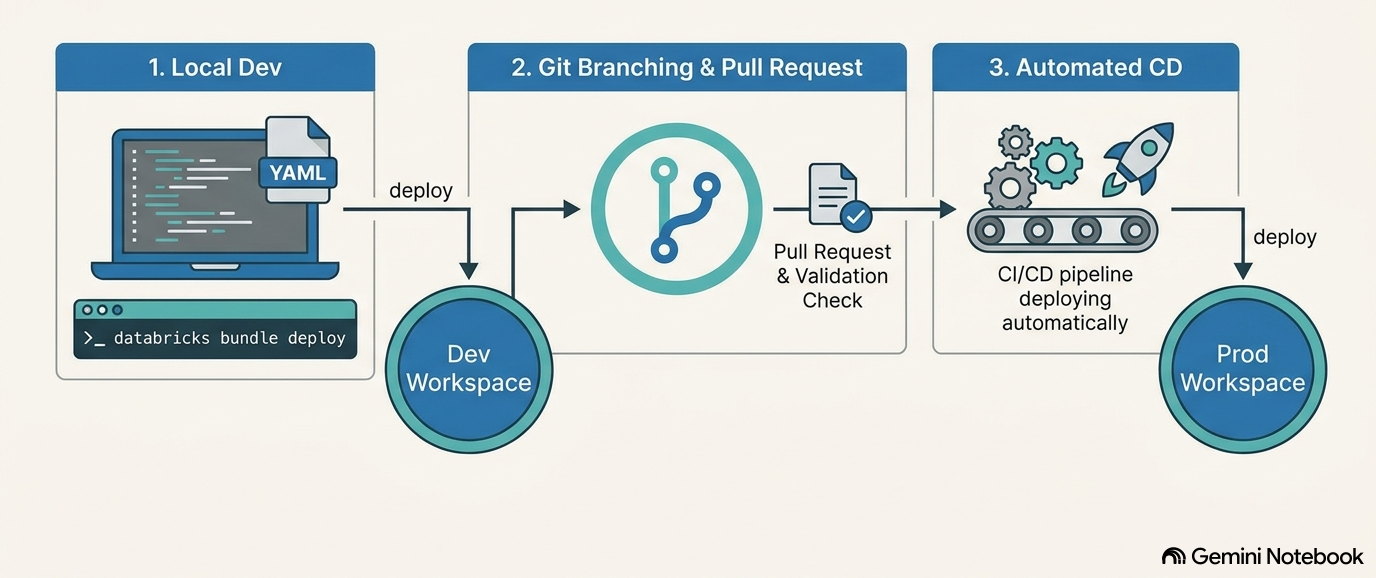
Databricks Asset Bundles (DABs) describe workspace artifacts, such as jobs, Lakeflow pipelines, and notebooks, in YAML that lives next to the code it deploys. One bundle declares multiple targets, so dev and prod are the same definition with different workspaces and run identities (Picture 2).
The FOCUS transform job as a bundle-managed workflow
The scheduled SQL transformation from Part 1, the one mapping system.billing.usage into FOCUS columns, becomes a
job resource in the bundle instead of a job somebody once configured in the UI:
bundle:
  name: focus-cost-pipeline

resources:
  jobs:
    focus_transform:
      name: focus-transform-${bundle.target}
      schedule:
        quartz_cron_expression: "0 0 3 * * ?"
        timezone_id: UTC
      tasks:
        - task_key: system_tables_to_focus
          sql_task:
            file:
              path: ../sql/system_tables_to_focus.sql
            warehouse_id: ${var.warehouse_id}

targets:
  dev:
    default: true
    workspace:
      host: https://adb-dev.azuredatabricks.net
  prod:
    workspace:
      host: https://adb-prod.azuredatabricks.net
    run_as:
      service_principal_name: ${var.pipeline_sp}
databricks bundle deploy -t prod becomes the only path to production, and the CI pipeline that runs it is the same
pull-request-gated machinery the Terraform layers use.
Unity Catalog objects via the Terraform Databricks provider
Catalogs, schemas, and grants stay in Terraform, managed with the Databricks Terraform provider (we pin 1.127.0). They are governance objects with a wider blast radius than an individual job, so the platform team owns their design and review. Bundles deploy workloads into that structure; they do not define it.
Trade-offs
DABs vs. Terraform: who owns the workspace objects
Both tools can create a Databricks job, which is how teams end up with drift and double ownership. Our split is by lifecycle and blast radius:
| Concern | Owner | Why |
|---|---|---|
| Workspaces, networking, storage | Terraform (landing zone modules) | Infrastructure lifecycle, subscription-level blast radius |
| Catalogs, schemas, grants | Terraform (Databricks provider) | Governance objects shared across teams |
| Cluster policies, warehouses | Terraform | Platform guardrails, changed by the platform team |
| Jobs, Lakeflow pipelines, notebooks | Asset Bundles | Workload lifecycle, deployed with the code they run |
The rule of thumb: if the Platform team would review the change, it is Terraform; if the Data engineering team owns it end to end, it is a bundle.
When the upstream modules are enough, and when to fork
The upstream modules are enough when your topology matches theirs, and constraint is a feature: it keeps you close to
the Cloud Adoption Framework baseline and lets you consume upgrades by bumping a tag. We forked only after hitting
inputs the modules did not expose, and we treat the fork as a liability with a standing task to upstream the
difference. What did not work was the middle path we tried first, wrapping the module and patching its outputs with
azapi resources: the wrapper broke on every minor release and reviewed worse than either clean option.
Conclusion
The honest cost first: pinned module versions go stale without a review cadence, the data landing zone module is pre-1.0 and can change interfaces between minor releases, and the DAB-versus-Terraform boundary is a live line that has moved between CLI releases, so re-check it when you upgrade. None of that outweighs what you get. The platform foundation, the workload landing zone, and the FOCUS transform job can all exist as code that a colleague reviews before it exists in Azure. If you already run the Part 1 pipeline, start where the payback is immediate: put the FOCUS transform job into a bundle, add the tag-enforcing cluster policy, and watch the unmatched bucket shrink in the next billing cycle.
The DMLZ is deliberately not presented as an implemented layer here. We plan to research its ownership model for organization-wide data governance and catalog capabilities, including Microsoft Purview and shared Microsoft Fabric capacity, before adding it to the platform.
FAQ
Should I use Databricks Asset Bundles or Terraform?
Both, split by ownership. Terraform manages infrastructure and governance objects: workspaces, networking, catalogs, schemas, grants, and cluster policies. Databricks Asset Bundles manage workload artifacts: jobs, Lakeflow pipelines, and notebooks, deployed alongside the code they run. The boundary follows blast radius: platform-team changes go through Terraform, workload-team changes go through bundles.
How do you deploy a data landing zone with Terraform?
Start with the Azure Landing Zones Accelerator platform landing zone template, which establishes the management-group hierarchy and central management and connectivity subscriptions. Then deploy each data landing zone as an application landing zone with Databricks workspaces, storage, and private networking. Pin module versions, isolate remote state per layer and environment, and apply only through a CI/CD pipeline.
How do you enforce cost-attribution tags on Azure Databricks clusters?
At provision time, in two layers. Landing-zone Terraform makes cost_center and team_owner tags required inputs on
every resource it creates, and Databricks cluster policies, themselves Terraform resources, force custom_tags on
every user-created cluster. Enforced tags propagate to the underlying VMs, which is what keeps costs out of the
unmatched bucket described in Part 1 of this series.
Can Databricks Asset Bundles manage Unity Catalog objects?
Bundle support for Unity Catalog securables is limited, and we deliberately do not use it. Catalogs, schemas, and grants are governance objects shared across teams, so they belong in Terraform with the Databricks provider, where changes get platform-team review. Bundles reference the catalogs and schemas they deploy into; they should not create them.